The "financial aid refund" email that wants your debit card
On Monday a college student we know got an email in their school inbox promising a financial aid refund. They had a feeling it was wrong and forwarded it to us before doing anything. They were right. Here is the whole email, line by line, and what it was really after.
We are sharing it because it is a good example of a scam that gets past spam filters and catches careful people. It appeared to come from a real address at the student's own school. It had no attachment. The link led to an ordinary Google page. Nothing in it looks like an obvious attack, and what it dangles is the money a student is waiting on. Several universities have published warnings about this same kind of lure.
We've removed the student's name, the name on the sending account, the school's name, and the real link. The wording is exactly as it arrived.
The email, line by line
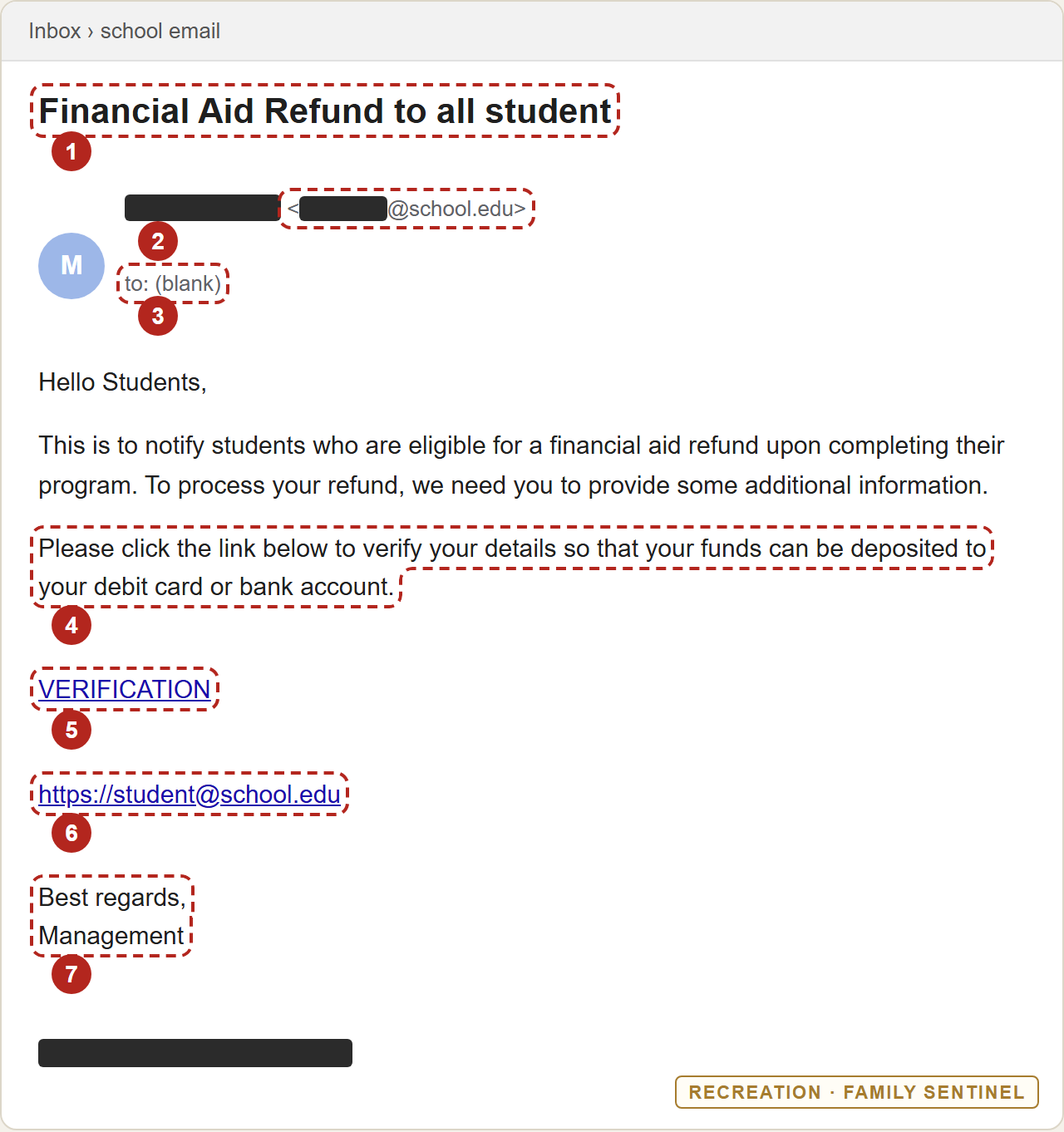
- The subject line: "Financial Aid Refund to all student." It isn't addressed to you, it's sent to everyone, and it has a grammar slip that no financial aid office would let through. Money plus "all students" is a sign of a mass mailing.
- The sender looks like a real school address, just the wrong one. It showed an ordinary person's name at the same university, not the financial aid office. We only have a forwarded copy, so we can't prove whether that person's account was broken into or the sender line was faked. A hijacked account is the more common explanation, and the school's filters didn't stop it either way. If a real person's name is on a money email and that person has nothing to do with your money, stop. They are probably a victim too, so tell the school's IT team rather than replying to them.
- The "To" line is blank, and it opens with "Hello Students." A blank To line usually means everyone was blind-copied (the other recipients are hidden), so you can't see how many people got it. Real aid notices are sent to you, by name.
- "Verify your details so your funds can be deposited to your debit card or bank account." This is what the email is for. Real refunds go to the refund method you set up with your school, usually through its official student portal or the bursar's office. A real financial aid office doesn't collect card numbers through a link in an email. Notice the odd wording too: a refund "upon completing their program" makes little sense to a student who is still enrolled.
- A button that just says "VERIFICATION." It doesn't say what you're verifying, where it goes, or which office runs it.
- A link written to look like your school. The second link reads
https://student@[school].edu. That is not a real web address. It's an email address with "https://" stuck on the front so it looks official. The text you see on a link and the place it actually sends you are two separate things. This one, like the button above it, went to a Google Form. - Signed "Management." No office, no name, no phone number, no building. A real aid office signs its emails and tells you how to reach it.
There's an eighth tell that you can't see in the picture: the timing. Refunds are usually paid out in the first weeks of a term, so many students are waiting on money right now. Scammers pick the moment you most want the email to be real.
Where the link actually went
We opened the link inside a sealed-off test computer (a disposable machine security teams use so that nothing on a page can touch a real device). It was a Google Form titled "Student Financial Aid Refund." Here are the questions, in order:
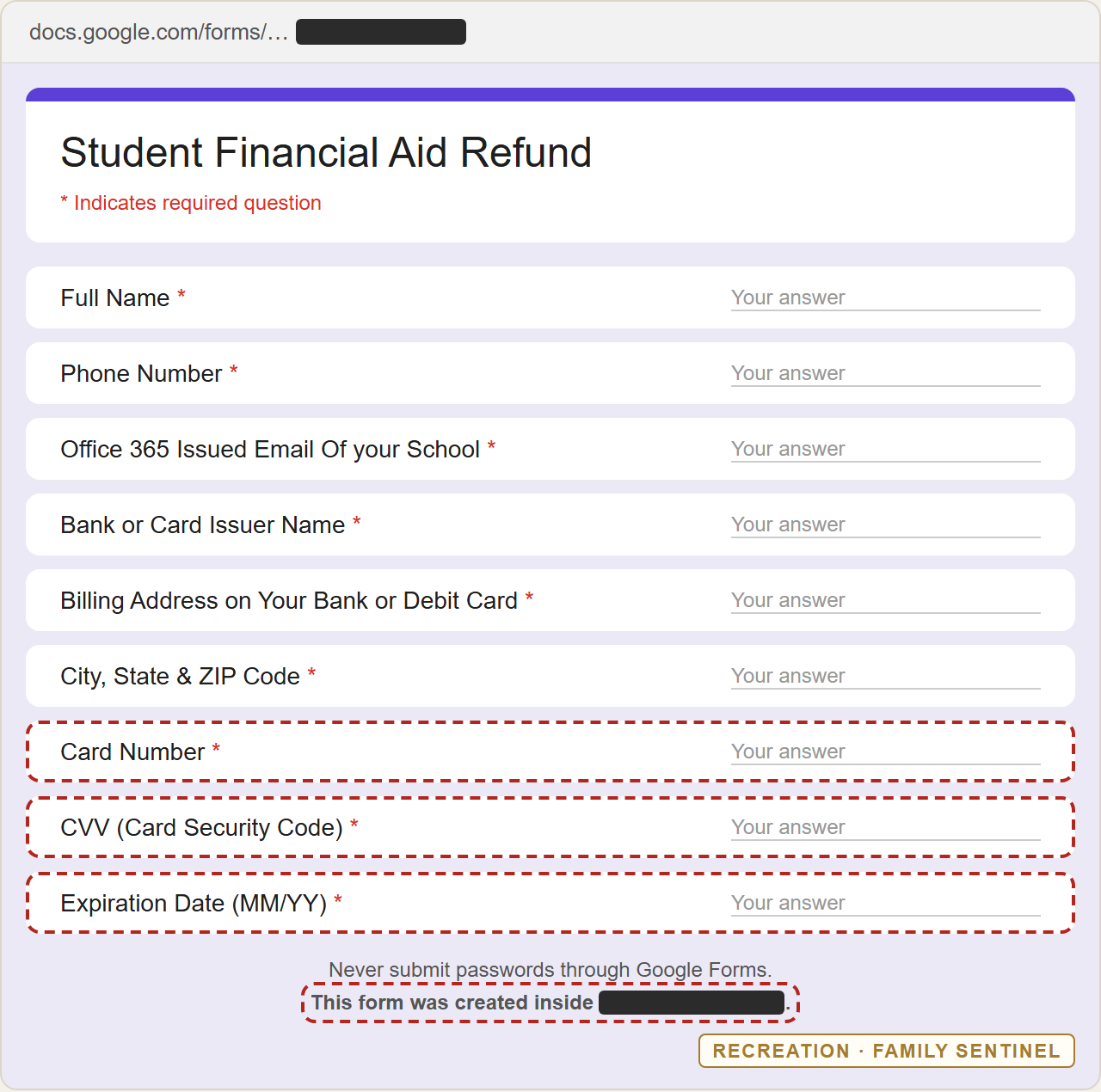
- Full name, phone number and school email. With these they can contact you again by text, and they know which school account to go after next.
- Bank name, billing address, city, state and ZIP. Online stores check these against the card.
- Card number, security code (the "CVV", the three digits on the back) and expiration date. Together with the billing address, these let someone shop online as you. No refund in the world needs that security code. That code exists to prove you are holding the card while you pay. It has nothing to do with getting paid.
Two more details at the bottom of the form give it away. Google adds its own warning to every form: "Never submit passwords through Google Forms." And the form says which organization's account built it. It wasn't the student's university. It was an unrelated high school, so this was most likely a second hijacked or misused account.
Why your spam filter waved it through
The test computer we used rated the link "No threats detected." In a narrow sense that was accurate. There was no virus and no fake login page, just a Google Form on Google's own website, so a link scanner has little to object to. The email itself still reached the inbox. The trick isn't in the technology. It's in the questions.
That's why it matters to look at what a message asks you to do as well as where it came from. A real school account plus a money promise plus a request for card details is a warning, however clean each piece looks by itself.
What to do
If you got this email and didn't fill anything in:
- Don't click either link, even to "just look." There's nothing there for you, and it only puts you one step from the form.
- Report it, then delete it. In Gmail, open the three-dot menu and choose Report phishing. In Outlook, choose Report and then Report phishing. Then send it to your school's IT or security team, following the instructions on their help page (some ask you to forward it as an attachment). They want to know, because one of their own accounts appears to be sending it, and they can get the form taken down.
- Check any refund the real way. Type your school's student portal address yourself, or call the financial aid office using the number on the school's website. If you're owed money, it will show there.
- Warn your friends. It was sent to a long list. A two-line text to the group chat may save someone their rent money.
If you already filled in the form:
- Call your bank or card issuer now, using the number on the back of your card. Tell them the card details were stolen, ask them to cancel and reissue the card, and dispute any charges you don't recognize.
- Change your school email password as a precaution. The form collected your school address, so expect that account to be targeted next. Turn down any sign-in approval prompt you didn't start yourself; some schools warn that victims of this scam get follow-up texts asking them to approve a login.
- Check your direct-deposit details in the student portal to make sure nobody has changed where your refund goes.
- Tell your school's IT team what you entered, so they can protect your account and see how widely the email spread.
- Ignore any follow-up text or call about your "refund," and never call a number it gives you.
- If a follow-up got further details from you, such as a Social Security number or date of birth, report it at IdentityTheft.gov and consider a free credit freeze with Equifax, Experian and TransUnion.
Parents and grandparents: please send this to the college students in your family. They're the ones being targeted, and the email is designed to look like the help they're waiting for. The same trick works on anyone: a "refund," "rebate" or "unclaimed payment" email that asks for your card is never paying you.
Related reading
- If you clicked: the first hour. A step-by-step checklist for when you've already typed something in.
- How to report a suspicious email. Where to send it, and how to keep the evidence your school or bank will want.
- The fake invitation card from a hijacked friend's account. The same trick, where a familiar sender gets past your guard.
We read what the email is asking for.
This message had a school-looking sender, no virus and a genuine Google page, and it still reached the inbox. Family Sentinel reads what every message is asking for, not just where it came from, and alerts your family within minutes when a trusted-looking email is really after a card, a password or a payment. It's read-only by design, with a real Security Architect behind it.
Start your free month →Want the next threat before it reaches you?
Scam Watch goes out regularly — the newest scams and how to spot them, in plain English. Free.