The invitation from a friend that isn't from your friend
An email arrives from someone you actually know — a real friend, a member of your church, someone whose address you'd recognize anywhere. It looks like a party invitation. You're one of dozens of names quietly copied on it. And opening it asks you for your email password. That last part is the whole scam.
One person described it plainly in a public post after it happened to her: she opened what looked like an e-vite, it asked for a password, and it kept telling her the password was wrong — so she kept trying every password she could think of, handing over each one in turn. Her warning to everyone who knew her: "if you get one from my email, it's not me." By the time she posted that, her account had already sent the same card to her entire contact list.
What it looks like
The email shows up in a normal inbox, not a spam folder, because it comes from a normal, real email account — one that belongs to someone the recipient knows personally. The giveaway, if you look closely at the header, is that the recipient's own address sits in the Bcc field rather than the To or Cc line. That single detail means the message didn't go to one person. It went to the sender's entire contact list at once, with everyone blind-copied so no one sees the size of the list.
The body of the email is image-heavy and polished: a card styled to look like a Paperless Post invitation, a "For: Friends & Family" label, a lavender envelope graphic with a postmark, and a button that says something like "View the Card." The wording varies — some versions describe an e-invite for dinner, others for brunch — but there's rarely a specific date, place, or personal note attached. It's a shell built to get one click.
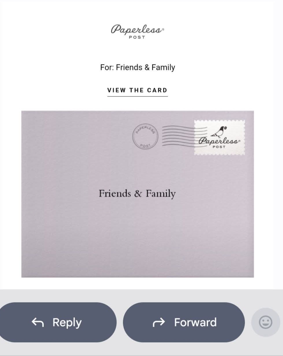
Click that button and the trap does the rest. A page opens asking you to enter your email password to "view the invitation." Type it, and the page says the password is wrong. Type it again, a variation, another password entirely — it keeps rejecting whatever you enter, and each attempt is captured before the rejection ever shows up. There is no invitation. There never was. The only thing being collected is a list of passwords you actually use.
Why it works
- It comes from a real, unmodified email account. This isn't a spoofed sender name — it is an actual send from the actual mailbox, so it passes every technical check a mail server runs (SPF, DKIM, DMARC) and sails through spam filtering that looks for forged senders. The systems built to catch a fake "from" address have nothing to catch here, because nothing about the address is fake.
- It borrows real trust. A message from a stranger gets scrutiny. A message from your friend, your cousin, or someone from church gets the benefit of the doubt — which is exactly the reaction the attacker is depending on.
- The Bcc field hides the scale. Seeing your own name alone in the To line feels personal, like this friend thought of you specifically. It also means you can't see the dozens or hundreds of other people who got the identical message, which would otherwise be an obvious tell.
- The "wrong password" loop is the actual attack. A real invitation service never asks for your email password to view a card — there is no legitimate reason it ever would. The repeated "incorrect password" message isn't a bug; it's designed to make you keep typing, so the attacker collects several passwords instead of just one, in case you reuse them elsewhere.
The chain reaction
Once a password is entered on that page, the attacker logs into the real account behind the scenes. From there, the cycle repeats itself automatically: the same card gets sent to that person's entire contact list, from their real address, carrying their real trust — and each new recipient becomes a candidate to repeat the cycle again. It spreads less like a phishing campaign and more like a chain letter, with every victim's address book becoming the next batch of targets.
The compromised account rarely stops at sending the card. Attackers commonly return to it later for follow-up scams — a message to a contact that says something like "are you available? I need a favor," often leading into a request for gift cards. Many also quietly add hidden inbox filters or rules to the compromised account: rules that delete or archive any reply containing words like "hacked," "scam," or "compromised," and sometimes forwarding rules that copy mail to the attacker going forward. The effect is that the real account owner can go a long time without ever seeing the replies warning them something is wrong.
How to spot it
- Check who it's actually addressed to. A real invitation from Paperless Post, Evite, or Punchbowl comes from the platform itself — a paperlesspost.com or evite.com address — with the host's name in the message, not from your friend's personal Gmail or Yahoo account.
- Check the To/Cc/Bcc line. If you're blind-copied alongside a card claiming to be personal, that's already a contradiction. A genuine host-sent invitation names its guests, or at minimum doesn't hide the guest list from view.
- Look at where the button actually leads. On a phone, press and hold the "View the Card" button instead of tapping it, and a preview of the real destination address appears. On a computer, hover over it without clicking and look at the address shown in the corner of the browser. If that address isn't the platform named in the card, don't click.
- Notice what's missing. A real invitation usually includes a specific date, time, and location, or at least a personal note from the host. A card that's all image and no detail, with nothing to look at except a button, is a shell built for one purpose.
- Remember the one rule. An invitation should never require your email password to view it. If any card, document link, or "shared file" notice asks for that, close it.
What to do
A) You received one — haven't clicked
- Don't click the button.
- If you're unsure whether it's really from your friend, contact them by phone or text — not by replying to the email. If the account is compromised, the attacker is the one reading replies, not your friend.
- Report it as phishing in your mail app (in Gmail: open the message, tap the three-dot menu, choose "Report phishing"), then delete it.
B) You clicked, and typed a password into the page
- From a different device if you can — one you're sure is clean — change the password on the email account tied to that page immediately.
- Also change every other account where you used any password you typed on that page, even variations. The fake page was designed to collect several attempts, and it counts on password reuse.
- Turn on 2-Step Verification, or a passkey if your provider offers one, on that email account and anywhere else you just changed a password.
- Then work through the full account-owner checklist below (C) — a captured password can be used quietly for some time before anything looks wrong.
C) It was sent from your account — the account-owner checklist
Gmail
- Run a full check at myaccount.google.com/security-checkup and follow what it flags.
- Change your password.
- Under "Your devices," sign out of any session or device you don't recognize. In Gmail on the web, scroll to the bottom of your inbox and click "Last account activity: Details," then sign out of all other web sessions.
- Confirm your recovery phone number and recovery email are still yours and weren't changed.
- In Settings, check "Filters and Blocked Addresses" and delete any filter you didn't create — especially one that deletes or archives incoming mail, which is how attackers hide replies warning you.
- In Settings, check "Forwarding and POP/IMAP" and remove any forwarding address you didn't set up.
- In Settings → "Accounts," check "Send mail as" and "Grant access to your account" and remove anything unfamiliar. Check your signature and vacation responder for anything you didn't write.
- Review "Third-party apps with account access" and remove anything you don't recognize.
- Check your Sent folder and Trash to see exactly what went out under your name.
Outlook.com
- Go to account.microsoft.com/security and review sign-in activity for anything unfamiliar.
- In Settings → Mail, check "Rules and Forwarding" and remove anything you didn't create.
Yahoo
- Check Account Security → Recent activity.
- In Settings, check Filters and Mailboxes/forwarding for anything unfamiliar.
Then, regardless of provider:
- Warn your contacts through a channel other than that email — text, a phone call, or a social media post — so they know not to trust the card if it reaches them too. A short message you can copy and paste:
My email account was briefly compromised and may have sent a fake "invitation" or "e-vite" card to my contacts. Please don't click the link in it or enter any passwords — it isn't from me. I've secured my account.
- Check your bank, Amazon, and any other accounts tied to that email address for password-reset emails you didn't request.
- Check haveibeenpwned.com for that email address.
- If you lost money as part of any follow-up scam, report it to the FBI at ic3.gov and the FTC at reportfraud.ftc.gov.
D) For families helping an older parent — what to set up this weekend
- Turn on 2-Step Verification (or a passkey) on their email account.
- Check that their recovery phone number and recovery email are current and actually reachable.
- Set them up with a password manager, or — if that's a step too far for now — a written password book kept at home, so passwords stop being reused across accounts.
- Agree on one household rule together: call me before you click anything that asks for a password. Not "text me," not "email me" — call, since a compromised email account is exactly what can't be trusted to carry that warning.
The one rule that stops all of it
No genuine invitation, card, or shared-document notice ever needs your email password to open it. Not once, and not for any reason a page can give you. If a "view" button leads to a password prompt, close it — the invitation was never real, and the account that sent it needs your help, not your password.
Frequently asked questions
Why didn't my spam filter catch this?
Because there's nothing forged for a filter to catch. The message comes from a real account, in good standing, that has sent real mail to these same contacts before. Spam and phishing filters are built to catch a fake or unfamiliar sender — this scam works precisely because the sender is neither.
My friend says they never sent me anything like this. Are they lying?
No — this is the normal experience of the person whose account was used. The card goes out automatically once the account is compromised, and the real owner usually has no idea it happened until someone tells them, or until they notice sent mail they don't remember writing.
I already typed my password once, then realized it looked wrong and stopped. Am I still at risk?
Yes, treat it exactly like checklist B above. Even one password entered on the fake page may have been captured, and the page's "incorrect password" loop is designed to make one attempt turn into several.
Can I just delete the email and move on?
If you haven't clicked anything, yes — report it as phishing and delete it. If you clicked the button or entered any password, deleting the email doesn't undo what the page already collected; you still need to change passwords and work through checklist B or C.
Is this the same as a normal phishing email?
The password-harvesting page works the same way a phishing page always has. What's different is the delivery: it doesn't arrive from a stranger or a spoofed address, it arrives from someone real, using their real account — which is why it's worth learning to recognize on its own.
How Family Sentinel helps
Family Sentinel's engine flags a card, invitation, or document-share notice that arrives from a person's own mailbox but whose button leads somewhere other than the platform it names — and it does this even when the sender is a trusted, long-standing contact, because that trust is exactly what this attack borrows. A person on our team reviews every alert before a family is contacted, so a flag means something. We don't claim to catch every variant of this scheme, and we are read-only by design: we don't block or delete email, and we can't fix an account that's already been compromised. What we can do is watch for the pattern and get a human warning to your family before the next click happens.
Related reading
- Protecting an older parent from scams — the conversations to have and the settings to check, while everything is calm and there's still time.
- The gift card email that looked like it came from her pastor — another scam that borrows trust from someone real.
- Scam Library: impersonation and account-takeover scams — how this scheme and dozens like it work, documented in plain language.
This scam spreads through the inbox — and that is where we watch.
A card or invitation from a real contact, leading somewhere it shouldn't: Family Sentinel reads every message in the inbox for exactly this pattern and gets a warning to your family fast — ideally before anyone types a password into a fake page. Read-only by design, with a real Security Architect behind every serious flag. Your family can also set a personal verification phrase, so a scammer can never fake a warning from us.
Start your free month →Want the next threat before it reaches you?
Scam Watch goes out regularly — the newest scams and how to spot them, in plain English. Free.