The Microsoft reset code you never asked for
A "password reset code" from Microsoft that you never asked for. Then another. The confusing part is that these emails can be genuine: Microsoft's own system sends them whenever anyone asks for a code for your address. Microsoft sent it, but you aren't the one who asked.
This week someone close to us forwarded a warning from an investing newsletter. The writer said he was getting about ten of these emails a day, even though he didn't think he had a Microsoft account. He said they come from Microsoft's real address, and he warned readers not to click anything in them. He's right not to click, and the situation is worth understanding, because "it came from the real Microsoft" is exactly what makes people trust it.
One honest note: we've seen a reader's screenshot and the newsletter's description, but not the technical details of these emails, so we can't confirm every copy is genuine. Lookalike fakes exist too. The good news is that the safe response is the same either way.
What the email looks like
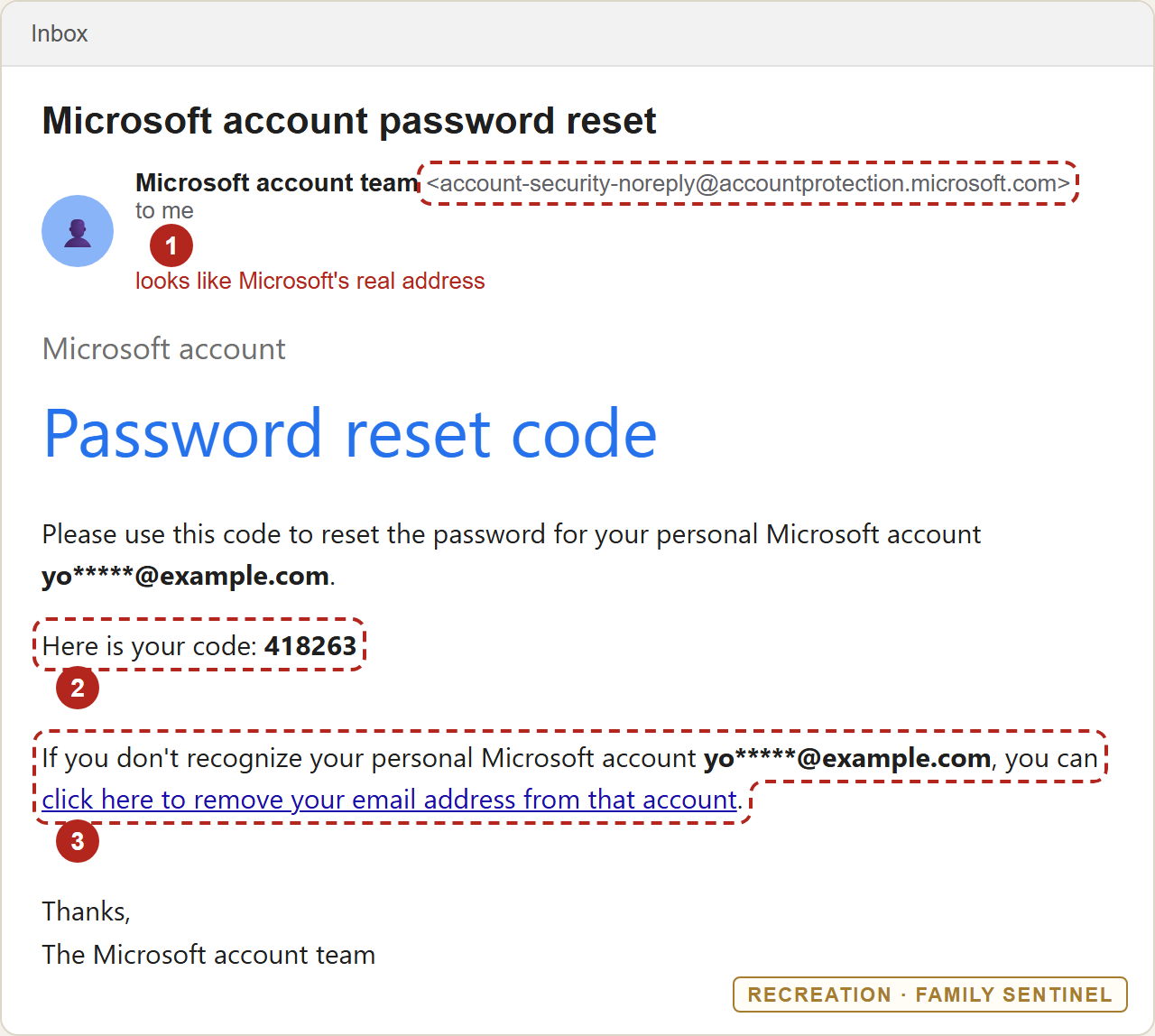
- A sender that looks like Microsoft's real account-security address. If the email really is from Microsoft, your spam filter has no reason to stop it, and "check the sender" won't settle the question this time.
- A code you never requested. Treat it like a house key: never hand it to anyone. Whoever has it can reset the password.
- A link offering to "remove your email address from that account." This is the link the newsletter writer warned about. It reaches you at the moment you're confused and a little alarmed.
Why you're getting these
Anyone can go to Microsoft's sign-in page, type in your email address, and click "Forgot password." Microsoft then emails a code to that address. Answers on Microsoft's support forum give three ordinary causes: someone is trying to get into the account, someone mistyped their own address, or a code arrived late. A steady stream usually means someone, or a computer program, keeps entering your address. The email alone can't tell you who.
The good news: the code alone doesn't let them in. It was sent to your inbox, not theirs. As long as nobody else can read your email and you don't give the code away, the reset goes nowhere. Their whole plan depends on getting you to do something next. (If you think someone may already be inside your email account, secure that account first, starting with a new password.)
One more thing. Many people have a Microsoft account without knowing it. An old Hotmail or Outlook.com address, an Xbox or Minecraft login, Skype, or a Windows computer set up years ago can all have created one. "I don't use Microsoft" doesn't always mean "I have no Microsoft account."
What the attacker is hoping you'll do
- Read the code to someone. A common next step is a phone call, text or email from "Microsoft Support" or "the security team" saying your account is under attack or locked, and that they need the code to fix it. That's the theft itself. Microsoft does not ask you to read back or reply with a code it sent you.
- Click a link in a lookalike email. Once people are used to seeing real reset emails, criminals send fake ones with the same layout. The links lead to a fake Microsoft sign-in page that collects your password.
- Click "remove my email address" in a panic. The newsletter warned that this link can be used to unhook your own email from your own account, so the attacker can attach theirs. We haven't been able to confirm that independently. The email's own wording presents the link as a way to take your address off an account you don't recognize. But you don't need to settle that question to stay safe: you should never change your account's security settings from a link in an email you didn't ask for.
What to do
- Don't click anything in the email. Not the code, not "remove my email address," not "report." Leave the links alone.
- Never share the code, by phone, text, email or chat, with anyone. That includes people who say they're from Microsoft, your bank, or your internet provider. Hang up on anyone who asks for it.
- Check your account the safe way. If you have a Microsoft account, type
account.microsoft.cominto your browser yourself and sign in. Under Security, look at Sign-in activity for anything you don't recognize, and check that the recovery email and phone number listed are yours. If you aren't sure you have an account and Microsoft says none exists for your address, that's a good sign. Stop there. - Make the account harder to break into. While you're signed in, turn on two-step verification (a second check, such as a code on your phone, on top of your password). Or switch to a passkey, which lets you sign in with your fingerprint, face or phone instead of a password. Then a stolen password alone won't get anyone in.
- If the flood won't stop and you do have an account: Microsoft's help pages explain how to add a second sign-in address (an "alias") and stop your public address from being used to sign in. That often quiets the codes, but it's a bigger change that can affect how you sign in to Outlook, Xbox or Windows. Ask a family member to help, and don't rush it.
- Then delete the email, or mark it as spam if they keep coming. It's done its job of warning you. If a message like this has an attachment, a phone number to call, or asks you to reply with the code, it's a fake: use Report phishing in your email app instead.
If you have read a code to someone, or typed your password into a page you reached from an email, act straight away. Type account.microsoft.com into your browser yourself, sign in, change your password, and check the recovery details. If you can't get in, choose Forgot password on that same sign-in page. Microsoft's account recovery form, account.live.com/acsr (also typed by hand), is the next step if that fails.
Related reading
- The "verification call" scam. What happens when someone phones asking for the code you were just sent.
- If you clicked: the first hour. A calm, step-by-step checklist for when you've already typed something in.
- How to check who really sent an email. Useful for spotting the lookalike versions.
A real sender isn't the same as a safe email.
An email can come from exactly where it says and still be part of someone else's plan. Family Sentinel reads every message for the move that follows: the lookalike "Microsoft" email with a fake sign-in link, or the "support" note asking for a code. It alerts your family within minutes, in plain English. It's read-only by design, with a real Security Architect behind it.
Start your free month →Want the next threat before it reaches you?
Scam Watch goes out regularly — the newest scams and how to spot them, in plain English. Free.